

WhatsApp Business Quality Rating and Messaging Limits: 2026 Guide
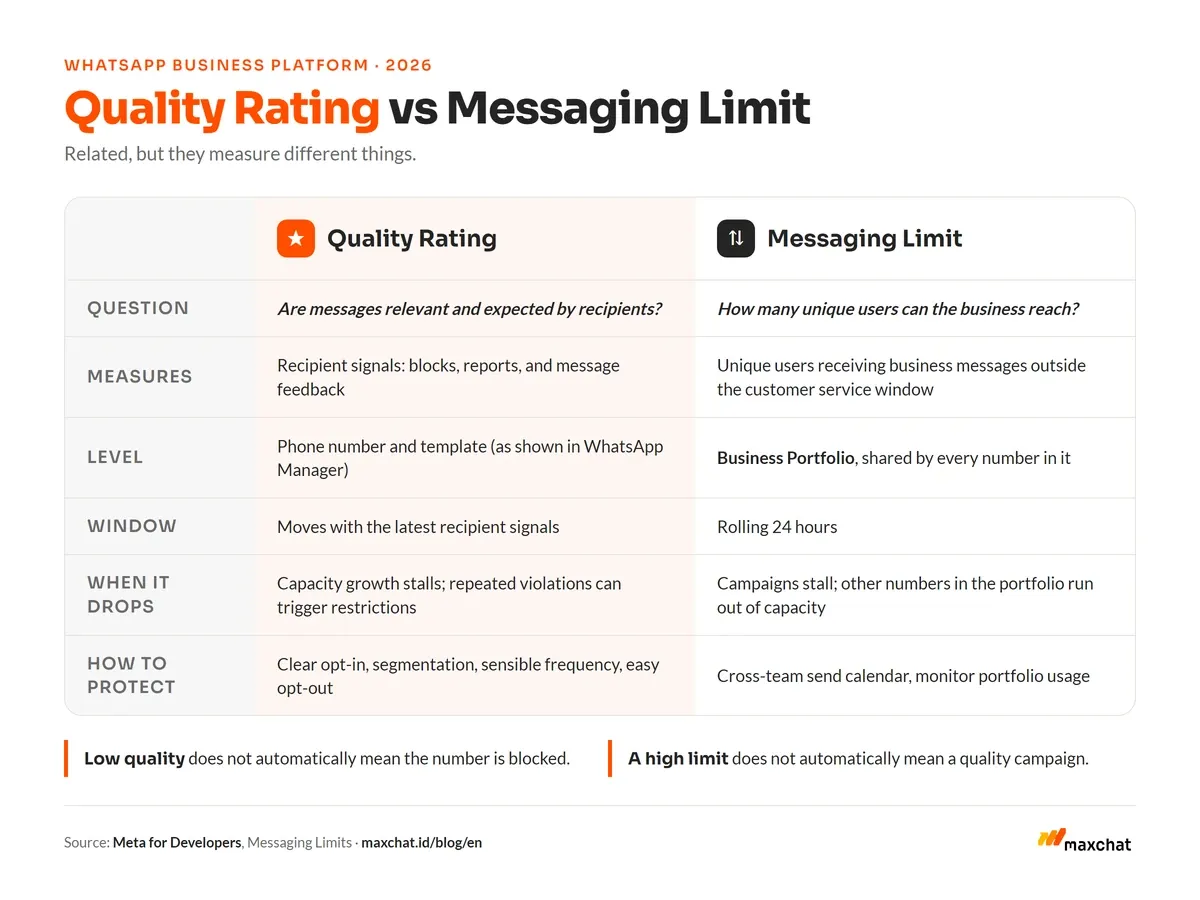
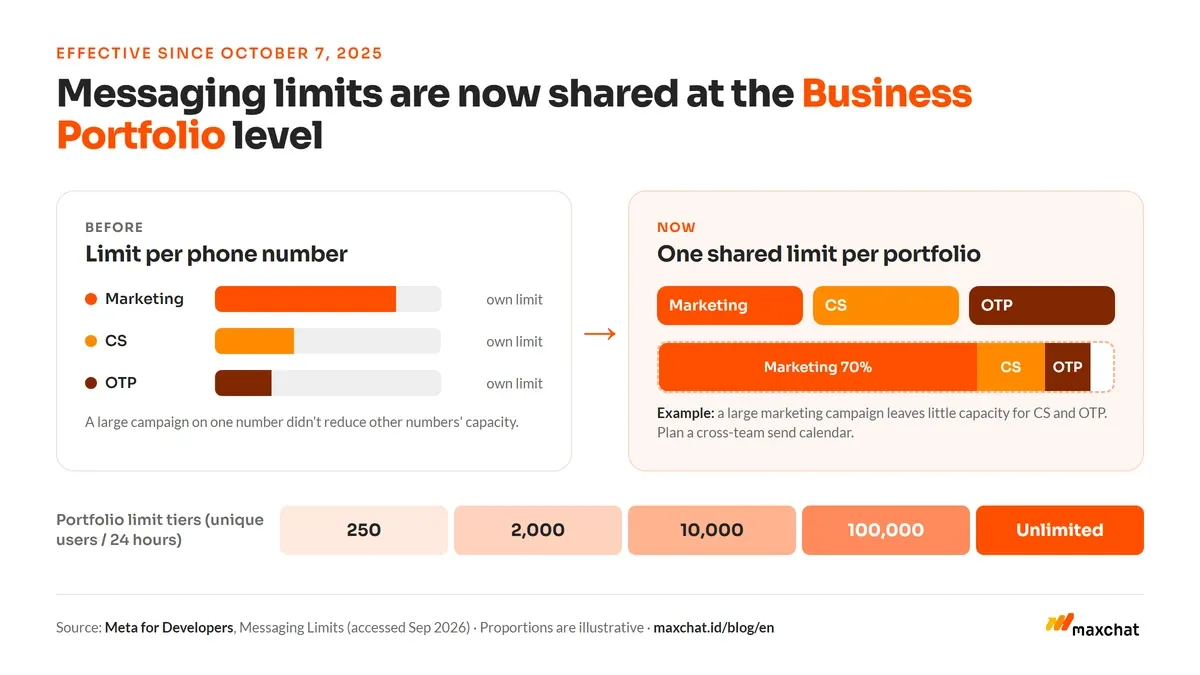
WhatsApp Business quality rating is a signal of message quality based on recipient responses and feedback, while the messaging limit caps how many unique users a business can reach outside the customer service window in a rolling 24-hour period. Since October 7, 2025, limits apply at the Meta Business Portfolio level and are shared by every phone number in it.
The two are related, but they are not the same thing. Quality rating helps teams see whether messages stay relevant and expected. The messaging limit sets how much business-initiated messaging capacity is available. Teams that treat them as one risk making the wrong call: stopping all messaging when quality dips, or assuming a high limit means campaigns are already good.
WhatsApp Business quality rating assesses message quality through signals such as blocks, reports, and recipient feedback. The messaging limit counts how many unique users can receive business messages outside the customer service window in a rolling 24 hours. Under the current model, limits are set at the Business Portfolio level, so multiple WhatsApp numbers in the same portfolio share capacity. A low-quality number does not automatically mean the whole account is blocked, but weak quality can hold back capacity increases and trigger restrictions if violations repeat. The safest way to protect both is to message only recipients who opted in, segment by need, tune frequency, provide a way to stop, and monitor results per template and per number. Coordinate the send calendar across teams so one campaign does not consume capacity other numbers also need. Because Meta can change these mechanics, always check WhatsApp Manager and the official documentation before running a large campaign.
What is WhatsApp Business quality rating?
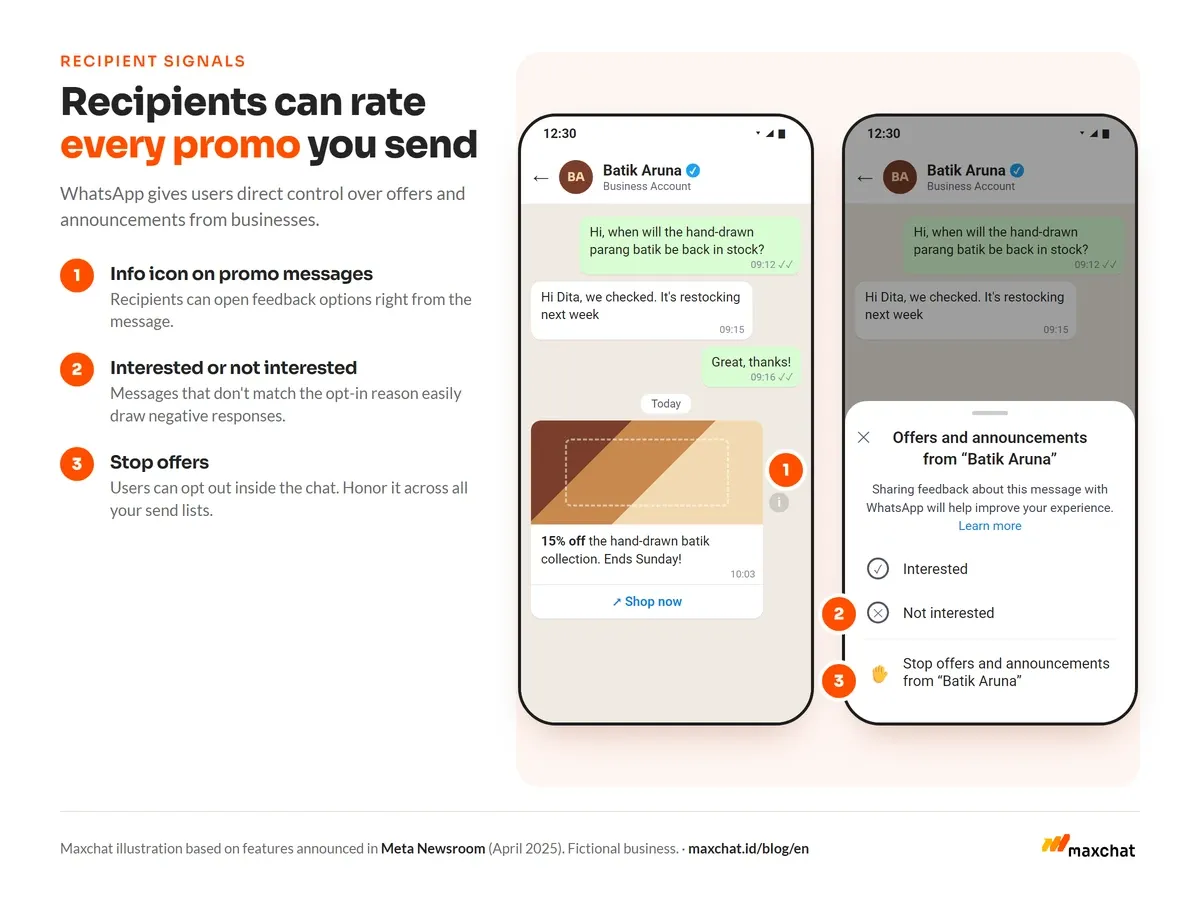
Quality rating is an indicator of how recipients respond to messages from a business phone number. Meta considers user signals, including blocks, reports, and the reasons people choose when they no longer want to receive messages.
The rating is not just a reputation score. It helps teams answer an operational question: are messages going to the right people, at the right time, with content they actually expect?
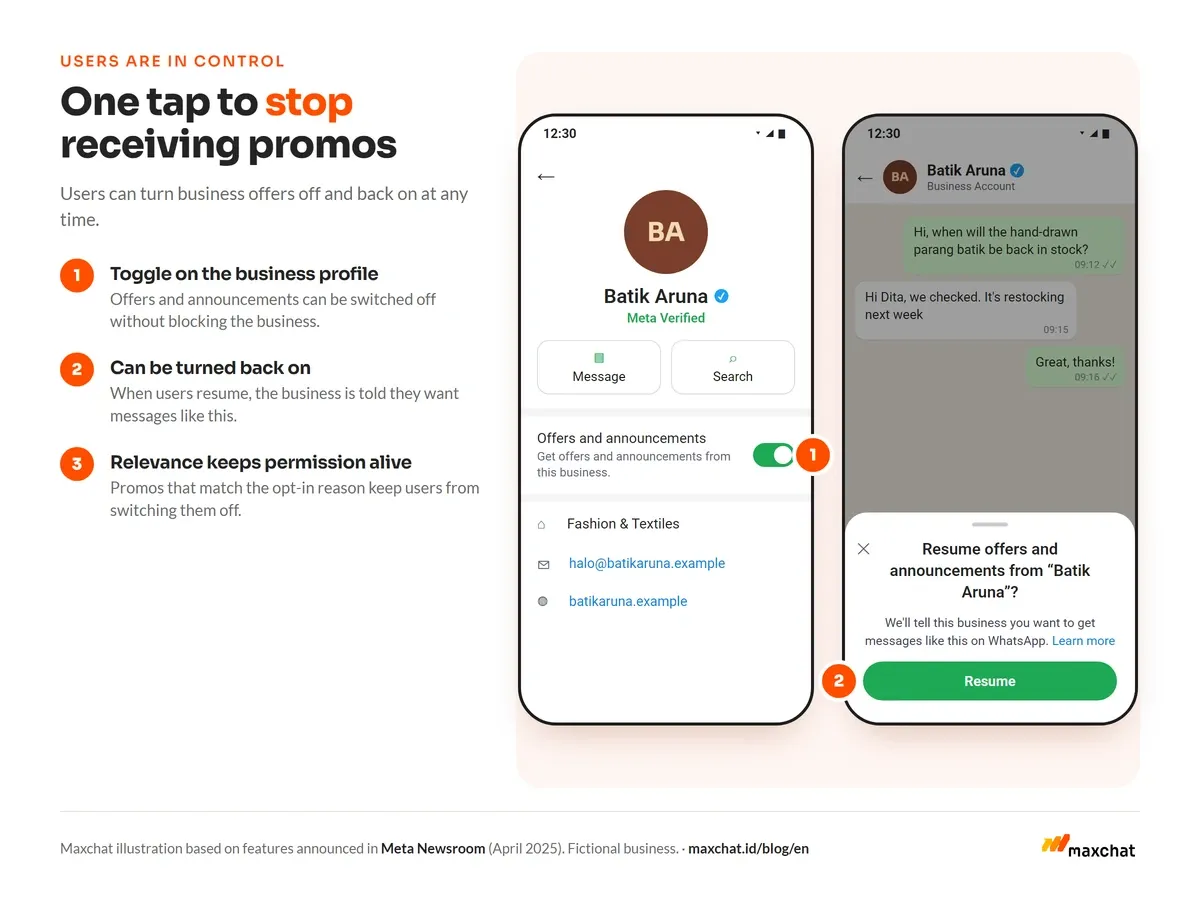
Meta is clear that users should be in control of business chats. Users can stop a chat, block, report, and give feedback on offers or announcements they receive. That is why message quality should be read as the result of relevance and recipient expectations, not just technical delivery success. See Meta's official explanation of how users manage business chats.
What signals can lower quality?
- The recipient list has no clear opt-in.
- Template content differs from the context in which people gave permission.
- Frequency is too high for what customers need.
- Segmentation is too broad, so messages feel irrelevant.
- The business name or message purpose is hard to recognize.
- Stop requests are not honored promptly.
- The same template keeps going out despite low engagement.
A campaign should never be judged on delivered rate alone. Read blocks, opt-outs, responses, conversions, and complaint patterns together.
What is the WhatsApp Business messaging limit?
The messaging limit is the number of unique WhatsApp users a business can message outside the customer service window in a rolling 24-hour period. It covers business-initiated messages, that is, when a business starts or reopens a conversation with an approved template.
Meta's latest documentation states that limits apply at the Business Portfolio level. If a portfolio has several numbers, they all share the same capacity. A large campaign from one number can reduce the capacity available to the others.
| Concept | What it measures | Level | Operational question |
|---|---|---|---|
| Quality rating | Message reception and quality signals | Number/template as shown in WhatsApp Manager | Are messages relevant and expected? |
| Messaging limit | Unique users reachable outside the service window | Business Portfolio | How much business-initiated capacity is available? |
| Throughput | Message processing speed | Number/infrastructure | How fast can messages be processed? |
| Enforcement | Actions taken for policy/account risk | Account, number, template, or portfolio | Is there a restriction to address? |
Don't rely on old tier tables without checking. Meta has changed the limit mechanics several times. Check the Messaging Limits documentation and WhatsApp Manager on the day you run a campaign.
What changed in October 2025?
The biggest change is the move from per-number limits to a shared limit at the Business Portfolio level. For teams with one number, the impact may be small. For organizations with several numbers, such as marketing, customer service, and OTP, it requires cross-team planning.
A simple example: when marketing sends a large campaign, the shared capacity may shrink for the other numbers in the portfolio. Campaign owners need to look at every unit's needs, not just one number's calendar.
How do you check quality rating and messaging limits?
The interface may change, but the general flow is:
- Sign in to Meta Business Suite or Business Manager that owns the Business Portfolio.
- Open WhatsApp Manager.
- Select the account and phone number to review.
- Review number/template quality in the available panel.
- Open Messaging Limits to see portfolio capacity and current usage.
- Record changes before and after each campaign.
For organizations with several numbers, keep a shared log of date, campaign name, template, segment, volume, quality state, opt-outs, and corrective actions. Taking WhatsApp Manager screenshots at the same time each day helps teams tell a trend from a one-off change.
How do you keep quality rating healthy?
1. Make opt-in specific and provable
WhatsApp policy states that businesses may only contact people who have shared their number and agreed to receive follow-up messages. The opt-in should state that messages will come via WhatsApp and name the business. Keep records of the time, source, wording, and purpose of each consent. Read the WhatsApp Business Messaging Policy.
2. Separate messages by purpose
Don't use one big list for every announcement. Distinguish customers waiting on an order status, asking for reminders, attending a webinar, or choosing to receive promos. Relevance starts with why someone gave permission.
3. Keep frequency reasonable
More messages do not automatically mean more results. Set an internal frequency cap and stop sending to recipients who don't respond within an agreed period.
4. Make the way out easy
Explain how to stop receiving messages and process those requests without friction. An opt-out must apply to every relevant list, not just one campaign file.
5. Monitor per template, not just per campaign
Campaign names change while templates stay the same. Track which templates drive replies, conversions, opt-outs, or complaints. Pause variations that show negative signals and fix segmentation before increasing volume.
What should you do if quality drops?
- Stop increasing volume until you understand the cause.
- Identify which templates, segments, opt-in sources, and send times changed.
- Remove contacts whose consent you cannot prove.
- Reduce frequency and narrow segments.
- Clarify the business name, message purpose, and how to stop.
- Test with a small group before resuming the campaign.
- Document actions and compare changes in WhatsApp Manager.
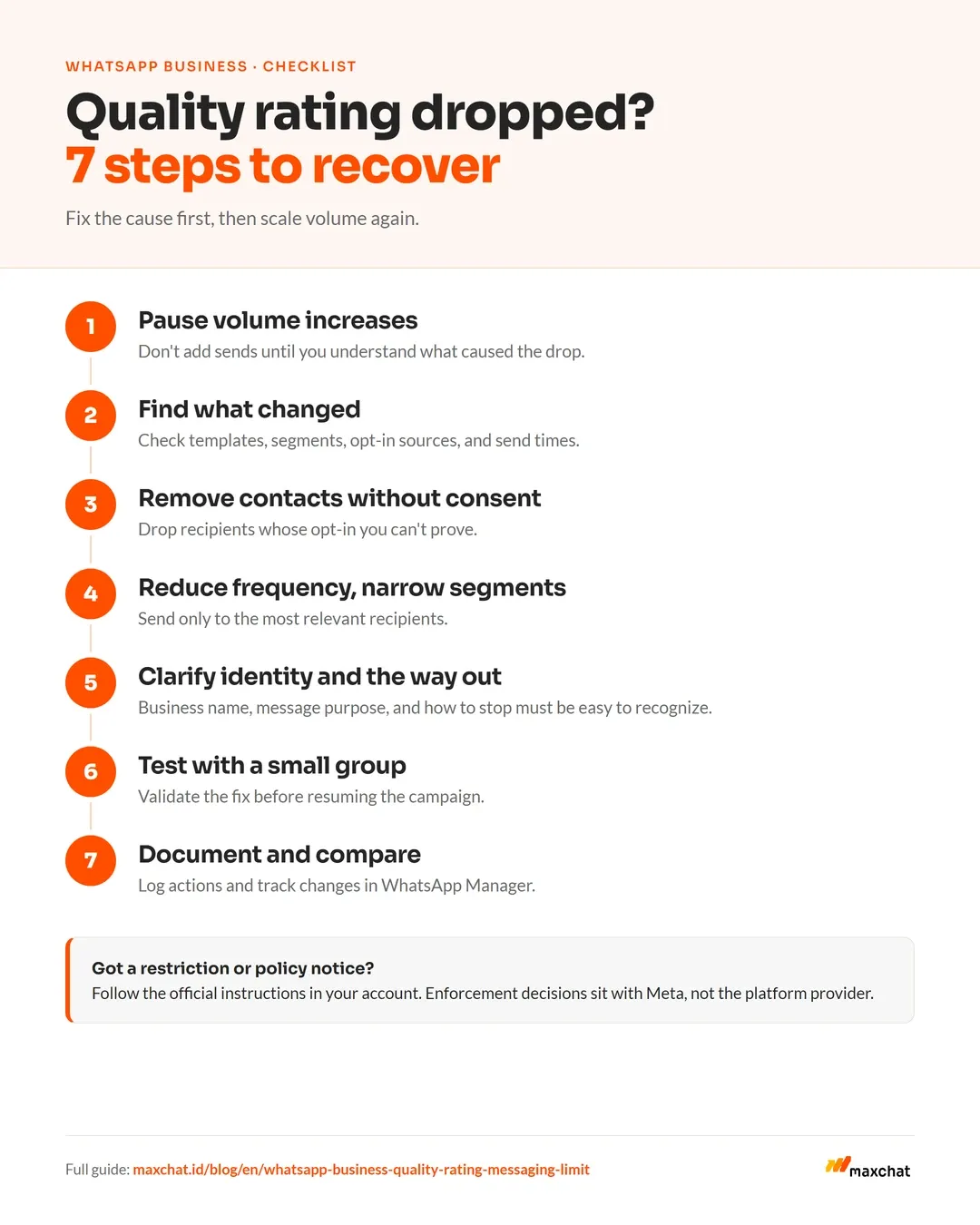
If you receive a restriction or policy notice, follow the official instructions in your account. Platform providers cannot guarantee a number won't be restricted, because enforcement decisions sit with Meta.
How does Maxchat help run more controlled messaging?
Maxchat offers broadcast, contact grouping, scheduling, and broadcast reports on selected plans. These features help teams build a tidier sending process, but quality still depends on consent, segmentation, content, frequency, and sender compliance.
Explore Maxchat Broadcast or talk to us about your portfolio structure, segmentation, and campaign workflow before scaling volume.
Frequently asked questions
Does a low quality rating automatically block a number?
Not always. Quality rating and enforcement are separate mechanisms. However, sustained low-quality signals or policy violations can lead to restrictions. Check your account notifications and the official documentation.
Does each phone number have its own messaging limit?
Under the portfolio model in effect since October 7, 2025, numbers in the same Business Portfolio share the portfolio limit. Verify your account's status in WhatsApp Manager.
Do replies to customer chats count toward the messaging limit?
The messaging limit covers business-initiated messages outside the customer service window. Window rules, message categories, and pricing can change; check Meta's documentation and your account configuration before making operational estimates.
Planning more controlled WhatsApp broadcasts? Talk to the Maxchat team about your WhatsApp API needs and campaign workflow.
Sources
- Meta for Developers, Messaging Limits.
- WhatsApp Business, WhatsApp Business Messaging Policy.
- Meta Newsroom, Ways to Manage Your Business Chats on WhatsApp, April 3, 2025.